> ## Documentation Index
> Fetch the complete documentation index at: https://prowler-feat-jira-issue-dedup.mintlify.site/llms.txt
> Use this file to discover all available pages before exploring further.
> ## Agent Instructions
> Prowler product naming: Prowler App is now Prowler Local Server, and Prowler Enterprise is now Prowler Private Cloud. Always use the current names when answering. The full product reference is at /getting-started/products: Open Source projects are Prowler CLI, Prowler Local Server, Prowler Local Dashboard, and Prowler SDK; Prowler Products are Prowler Cloud, Prowler Private Cloud, Prowler Hub, Prowler Lighthouse AI, and Prowler MCP.
# Getting Started With Vercel on Prowler
export const VersionBadge = ({version}) => {
return
Added in:
{version}
;
};
Prowler for Vercel scans teams and projects for security misconfigurations, including deployment protection, environment variable exposure, WAF rules, domain configuration, team access controls, and more.
## Prerequisites
Set up authentication for Vercel with the [Vercel Authentication](/user-guide/providers/vercel/authentication) guide before starting:
* Create a Vercel API Token with access to the target team
* Identify the Team ID (optional, required to scope the scan to a single team)
Onboard Vercel using Prowler Cloud
Onboard Vercel using Prowler CLI
## Prowler Cloud
### Step 1: Add the Provider
1. Go to [Prowler Cloud](https://cloud.prowler.com/) or launch [Prowler Local Server](/user-guide/tutorials/prowler-app).
2. Navigate to "Configuration" > "Providers".
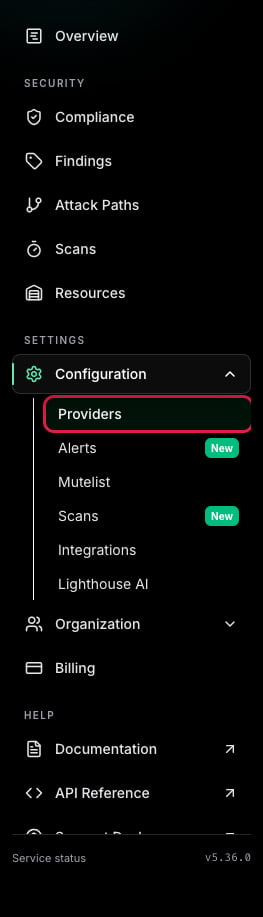 3. Click "Add Provider".
 4. Select "Vercel".
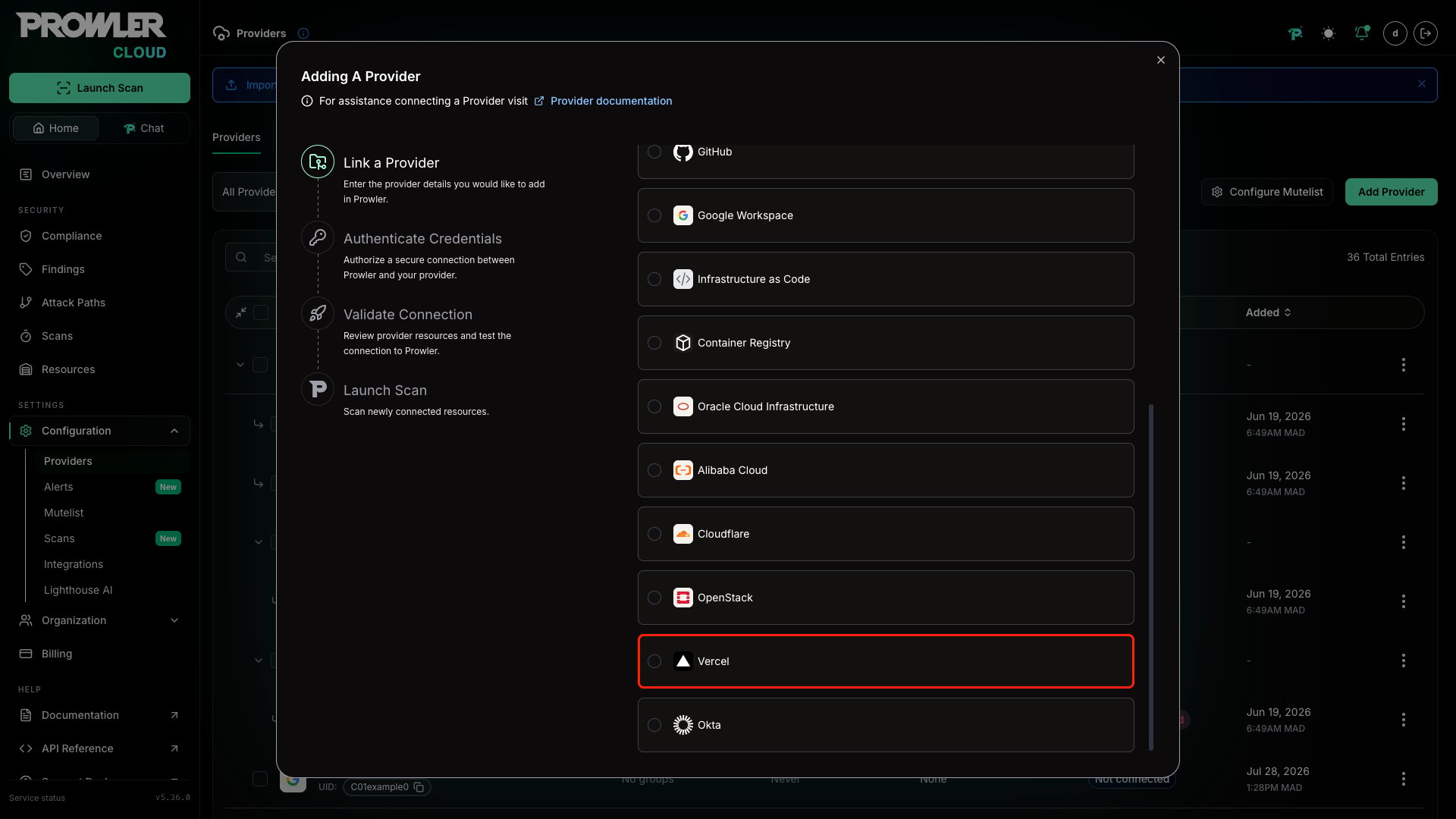 5. Enter the **Team ID** and an optional alias, then click "Next".
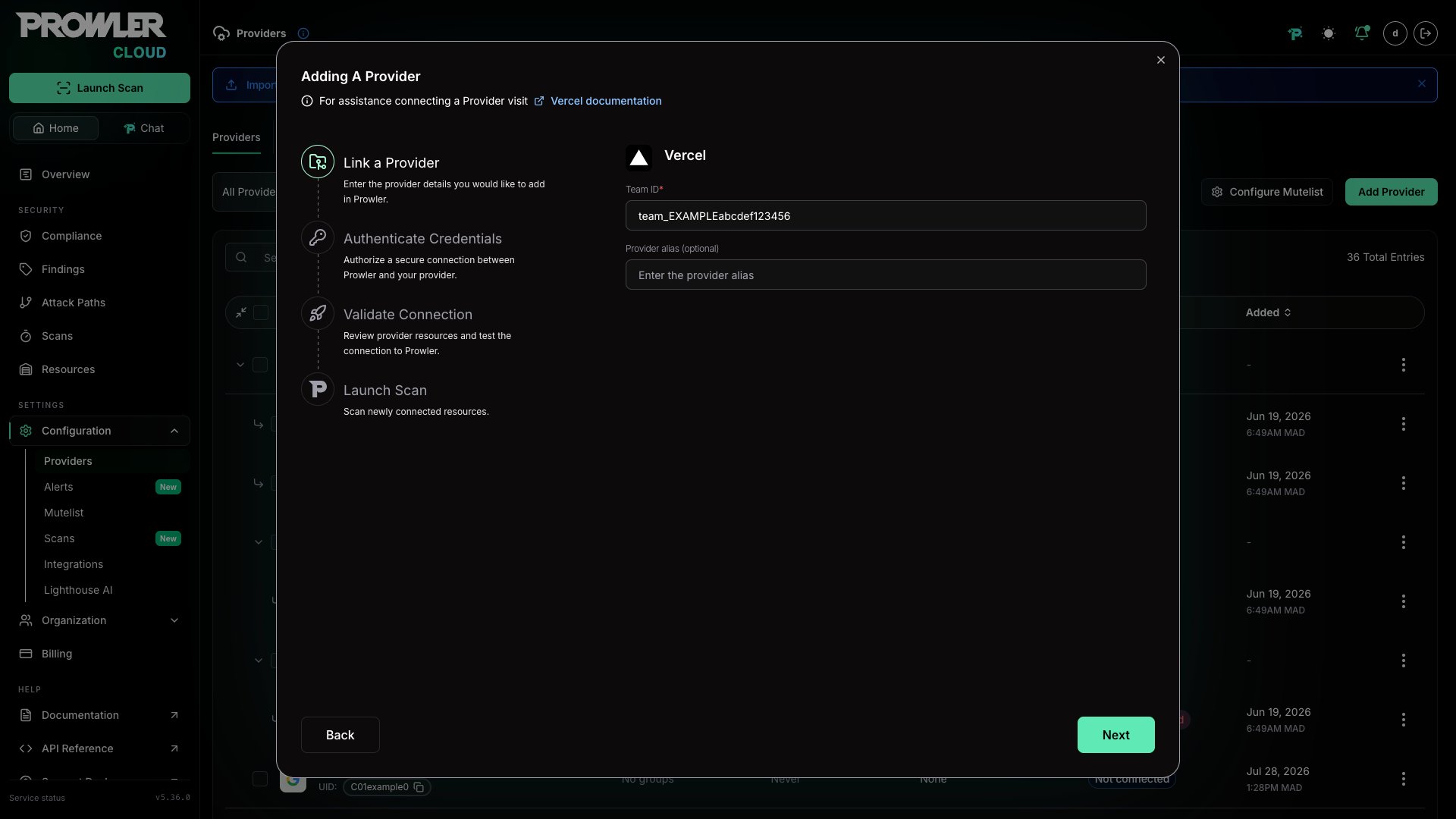 The Team ID can be found in the Vercel Dashboard under "Settings" > "General". It follows the format `team_xxxxxxxxxxxxxxxxxxxx`. For detailed instructions, see the [Authentication guide](/user-guide/providers/vercel/authentication).
### Step 2: Provide Credentials
1. Enter the **API Token** created in the Vercel Dashboard.
The Team ID can be found in the Vercel Dashboard under "Settings" > "General". It follows the format `team_xxxxxxxxxxxxxxxxxxxx`. For detailed instructions, see the [Authentication guide](/user-guide/providers/vercel/authentication).
### Step 2: Provide Credentials
1. Enter the **API Token** created in the Vercel Dashboard.
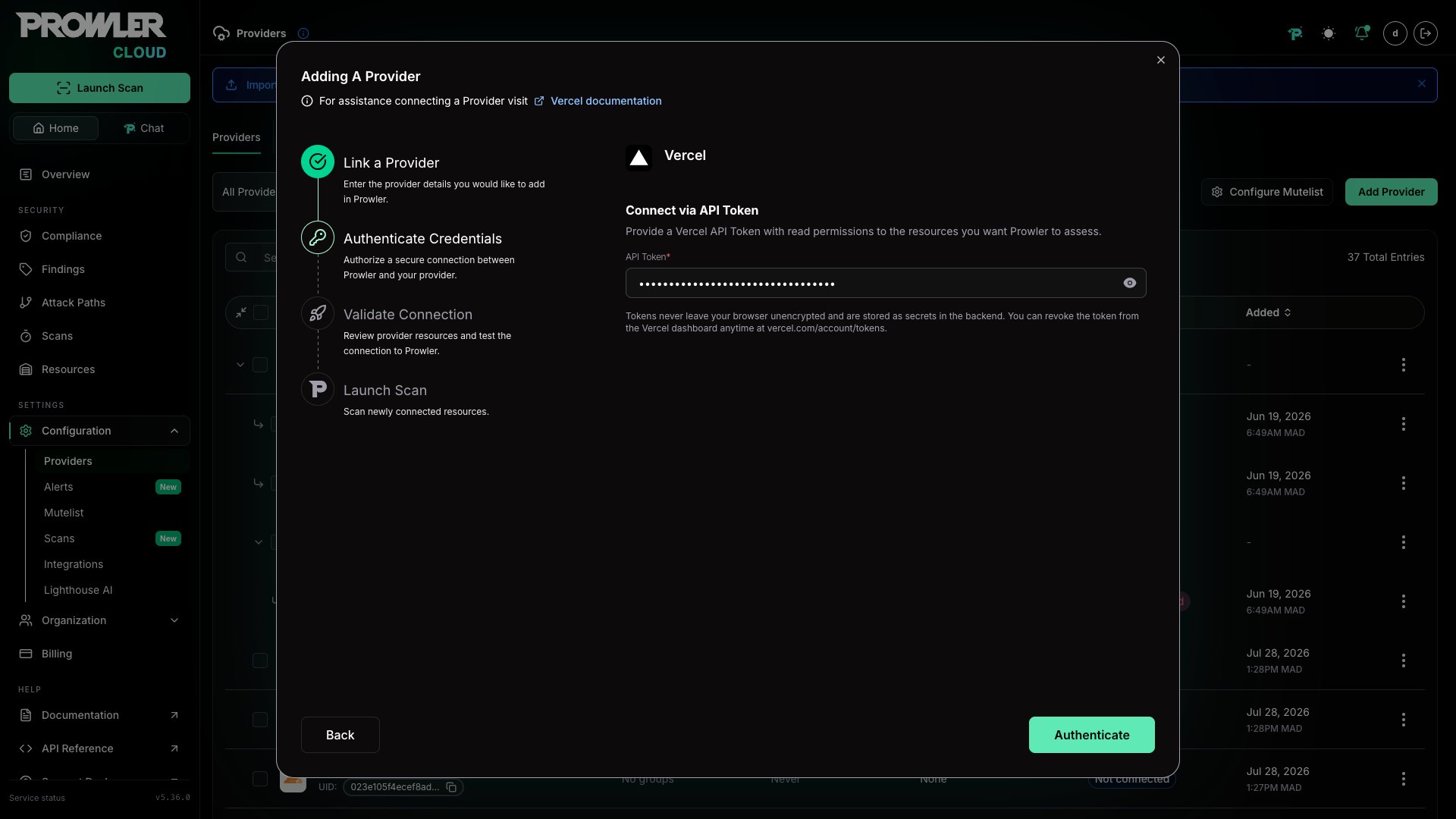 For the complete token creation workflow, follow the [Authentication guide](/user-guide/providers/vercel/authentication#api-token).
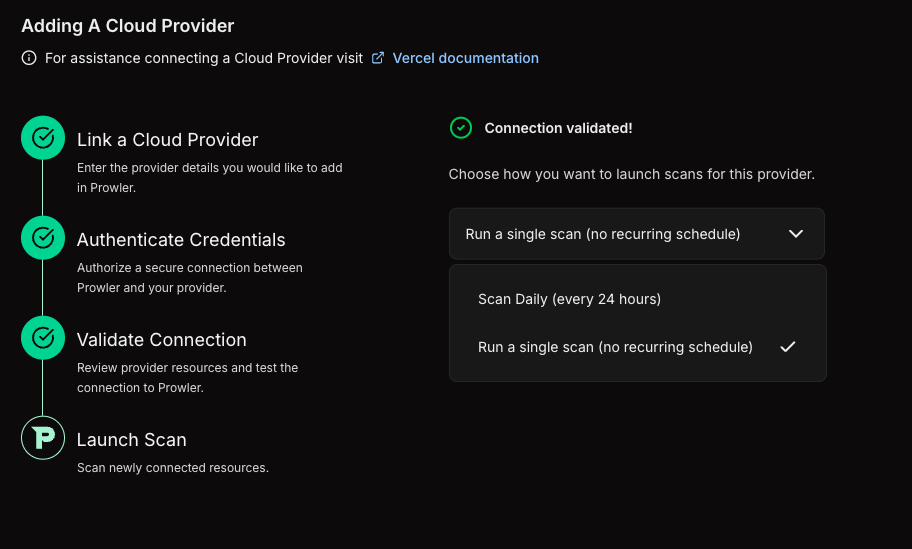
### Step 3: Launch the Scan
1. Review the connection summary.
2. Choose the scan schedule: run a single scan or set up daily scans (every 24 hours).
3. Click **Launch Scan** to start auditing Vercel.
For the complete token creation workflow, follow the [Authentication guide](/user-guide/providers/vercel/authentication#api-token).
### Step 3: Launch the Scan
1. Review the connection summary.
2. Choose the scan schedule: run a single scan or set up daily scans (every 24 hours).
3. Click **Launch Scan** to start auditing Vercel.
 ***
## Prowler CLI
### Step 1: Set Up Authentication
Follow the [Vercel Authentication](/user-guide/providers/vercel/authentication) guide to create an API Token, then export it:
```console theme={null}
export VERCEL_TOKEN="your-api-token-here"
```
Optionally, scope the scan to a specific team:
```console theme={null}
export VERCEL_TEAM="team_yourteamid"
```
### Step 2: Run the First Scan
Run a baseline scan after credentials are configured:
```console theme={null}
prowler vercel
```
Prowler automatically discovers all teams accessible with the provided token and runs security checks against them.
### Step 3: Filter the Scan Scope (Optional)
#### Filter by Team
To scan a specific team, set the `VERCEL_TEAM` environment variable with the Team ID or slug:
```console theme={null}
export VERCEL_TEAM="team_yourteamid"
prowler vercel
```
When no team is specified, Prowler auto-discovers all teams the authenticated user belongs to and scans each one.
#### Filter by Project
To scan only specific projects, use the `--project` argument:
```console theme={null}
prowler vercel --project my-project-name
```
Multiple projects can be specified:
```console theme={null}
prowler vercel --project my-project-name another-project
```
Project IDs are also supported:
```console theme={null}
prowler vercel --project prj_abc123def456
```
### Step 4: Use a Custom Configuration (Optional)
Prowler uses a configuration file to customize provider behavior. The Vercel configuration includes:
```yaml theme={null}
vercel:
# Maximum number of retries for API requests (default is 3)
max_retries: 3
```
To use a custom configuration:
```console theme={null}
prowler vercel --config-file /path/to/config.yaml
```
***
## Supported Services
Prowler for Vercel includes security checks across the following services:
| Service | Description |
| - | - |
| **Authentication** | Token expiration and staleness checks |
| **Deployment** | Preview deployment access and production stability |
| **Domain** | DNS configuration, SSL certificates, and wildcard exposure |
| **Project** | Deployment protection, environment variable security, fork protection, and skew protection |
| **Security** | Web Application Firewall (WAF), rate limiting, IP blocking, and managed rulesets |
| **Team** | SSO enforcement, directory sync, member access, and invitation hygiene |
## Checks With Explicit Plan-Based Behavior
Prowler currently includes 26 Vercel checks. The 11 checks below have explicit billing-plan handling in the provider metadata or check logic. When the scanned scope reports a billing plan, Prowler adds plan-aware context to findings for these checks. If the API does not expose the required configuration, Prowler may return `MANUAL` and require verification in the Vercel dashboard.
| Check ID | Hobby | Pro | Enterprise | Notes |
| - | - | - | - | - |
| `project_password_protection_enabled` | Not available | Available as a paid add-on | Available | Checks password protection for deployments |
| `project_production_deployment_protection_enabled` | Not available | Available with supported paid deployment protection options | Available | Checks protection for production deployments |
| `project_skew_protection_enabled` | Not available | Available | Available | Checks skew protection during rollouts |
| `security_custom_rules_configured` | Not available | Available | Available | Returns `MANUAL` when the firewall configuration cannot be assessed from the API |
| `security_ip_blocking_rules_configured` | Not available | Available | Available | Returns `MANUAL` when the firewall configuration cannot be assessed from the API |
| `team_saml_sso_enabled` | Not available | Available | Available | Checks team SAML SSO configuration |
| `team_saml_sso_enforced` | Not available | Available | Available | Checks SAML SSO enforcement for all team members |
| `team_directory_sync_enabled` | Not available | Not available | Available | Checks SCIM directory sync |
| `security_managed_rulesets_enabled` | Bot Protection and AI Bots managed rulesets | Bot Protection and AI Bots managed rulesets | All managed rulesets, including OWASP Core Ruleset | Returns `MANUAL` when the firewall configuration cannot be assessed from the API |
| `security_rate_limiting_configured` | Not available | Available | Available | Returns `MANUAL` when the firewall configuration cannot be assessed from the API |
| `security_waf_enabled` | Not available | Available | Available | Returns `MANUAL` when the firewall configuration cannot be assessed from the API |
The five firewall-related checks (`security_waf_enabled`, `security_custom_rules_configured`, `security_ip_blocking_rules_configured`, `security_rate_limiting_configured`, and `security_managed_rulesets_enabled`) return `MANUAL` when the firewall configuration endpoint is not accessible from the API. The other 15 current Vercel checks do not currently include plan-specific handling in provider logic, but every Vercel check includes exactly one billing-plan metadata category (`vercel-hobby-plan`, `vercel-pro-plan`, or `vercel-enterprise-plan`) alongside its functional security category.
This documentation is built and hosted on [Mintlify](https://mintlify.com), a developer documentation platform.
***
## Prowler CLI
### Step 1: Set Up Authentication
Follow the [Vercel Authentication](/user-guide/providers/vercel/authentication) guide to create an API Token, then export it:
```console theme={null}
export VERCEL_TOKEN="your-api-token-here"
```
Optionally, scope the scan to a specific team:
```console theme={null}
export VERCEL_TEAM="team_yourteamid"
```
### Step 2: Run the First Scan
Run a baseline scan after credentials are configured:
```console theme={null}
prowler vercel
```
Prowler automatically discovers all teams accessible with the provided token and runs security checks against them.
### Step 3: Filter the Scan Scope (Optional)
#### Filter by Team
To scan a specific team, set the `VERCEL_TEAM` environment variable with the Team ID or slug:
```console theme={null}
export VERCEL_TEAM="team_yourteamid"
prowler vercel
```
When no team is specified, Prowler auto-discovers all teams the authenticated user belongs to and scans each one.
#### Filter by Project
To scan only specific projects, use the `--project` argument:
```console theme={null}
prowler vercel --project my-project-name
```
Multiple projects can be specified:
```console theme={null}
prowler vercel --project my-project-name another-project
```
Project IDs are also supported:
```console theme={null}
prowler vercel --project prj_abc123def456
```
### Step 4: Use a Custom Configuration (Optional)
Prowler uses a configuration file to customize provider behavior. The Vercel configuration includes:
```yaml theme={null}
vercel:
# Maximum number of retries for API requests (default is 3)
max_retries: 3
```
To use a custom configuration:
```console theme={null}
prowler vercel --config-file /path/to/config.yaml
```
***
## Supported Services
Prowler for Vercel includes security checks across the following services:
| Service | Description |
| - | - |
| **Authentication** | Token expiration and staleness checks |
| **Deployment** | Preview deployment access and production stability |
| **Domain** | DNS configuration, SSL certificates, and wildcard exposure |
| **Project** | Deployment protection, environment variable security, fork protection, and skew protection |
| **Security** | Web Application Firewall (WAF), rate limiting, IP blocking, and managed rulesets |
| **Team** | SSO enforcement, directory sync, member access, and invitation hygiene |
## Checks With Explicit Plan-Based Behavior
Prowler currently includes 26 Vercel checks. The 11 checks below have explicit billing-plan handling in the provider metadata or check logic. When the scanned scope reports a billing plan, Prowler adds plan-aware context to findings for these checks. If the API does not expose the required configuration, Prowler may return `MANUAL` and require verification in the Vercel dashboard.
| Check ID | Hobby | Pro | Enterprise | Notes |
| - | - | - | - | - |
| `project_password_protection_enabled` | Not available | Available as a paid add-on | Available | Checks password protection for deployments |
| `project_production_deployment_protection_enabled` | Not available | Available with supported paid deployment protection options | Available | Checks protection for production deployments |
| `project_skew_protection_enabled` | Not available | Available | Available | Checks skew protection during rollouts |
| `security_custom_rules_configured` | Not available | Available | Available | Returns `MANUAL` when the firewall configuration cannot be assessed from the API |
| `security_ip_blocking_rules_configured` | Not available | Available | Available | Returns `MANUAL` when the firewall configuration cannot be assessed from the API |
| `team_saml_sso_enabled` | Not available | Available | Available | Checks team SAML SSO configuration |
| `team_saml_sso_enforced` | Not available | Available | Available | Checks SAML SSO enforcement for all team members |
| `team_directory_sync_enabled` | Not available | Not available | Available | Checks SCIM directory sync |
| `security_managed_rulesets_enabled` | Bot Protection and AI Bots managed rulesets | Bot Protection and AI Bots managed rulesets | All managed rulesets, including OWASP Core Ruleset | Returns `MANUAL` when the firewall configuration cannot be assessed from the API |
| `security_rate_limiting_configured` | Not available | Available | Available | Returns `MANUAL` when the firewall configuration cannot be assessed from the API |
| `security_waf_enabled` | Not available | Available | Available | Returns `MANUAL` when the firewall configuration cannot be assessed from the API |
The five firewall-related checks (`security_waf_enabled`, `security_custom_rules_configured`, `security_ip_blocking_rules_configured`, `security_rate_limiting_configured`, and `security_managed_rulesets_enabled`) return `MANUAL` when the firewall configuration endpoint is not accessible from the API. The other 15 current Vercel checks do not currently include plan-specific handling in provider logic, but every Vercel check includes exactly one billing-plan metadata category (`vercel-hobby-plan`, `vercel-pro-plan`, or `vercel-enterprise-plan`) alongside its functional security category.
This documentation is built and hosted on [Mintlify](https://mintlify.com), a developer documentation platform.